At a Glance
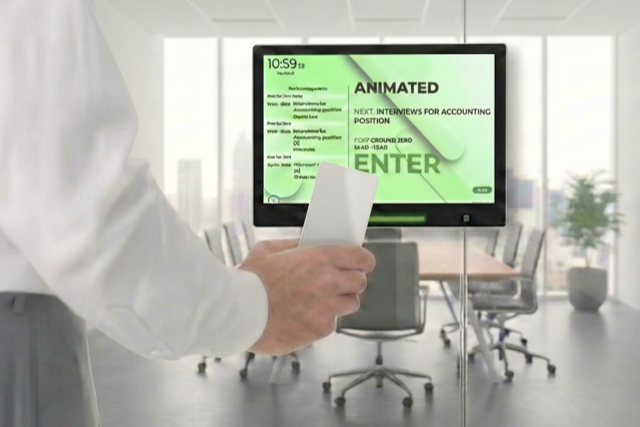
When integrated into meeting room displays, RFID lets you tie access permissions directly to bookings. With solutions like Door Tablet, users can tap their badge to check in, extend, or end meetings, but only if they’re authorised. That means no more anonymous use or walk-up takeovers. You can control who does what at the door, enforce booking policies, disable lost credentials remotely, and meet higher security standards with hardened device options.
Most people don’t give a second thought to tapping a badge on a meeting room tablet. For IT and facilities teams, however, that “tap-and-go” moment solves a long-standing headache like unauthorised use.
This article explores how RFID works in practice and how it can transform meeting room access for corporate HQs and government institutions.
What Access with RFID Looks Like
When employees walk up to a booked meeting room and tap their badge to unlock the door or check in, there’s usually one of two technologies at work behind the scenes.
RFID (Radio Frequency Identification) uses radio waves to allow passive ID cards or key fobs to transmit a unique identifier when held near a reader. It’s fast, contactless, and widely used in access control systems across offices worldwide.
A related technology is NFC (Near Field Communication), which is essentially a subset of RFID designed for very short-range interactions (a few centimetres) and often used with mobile devices.
Both RFID and NFC can enable secure, contactless access. However, in this article, we’ll focus on RFID and its use in room-booking panels, hot-desk kiosks and broader access control.
This technology helps automate the process of verifying that the person at the panel is allowed to be in that room at that time. There is more to it when it comes to meeting room panels; RFID can link people to bookings and actions.
RFID for Meeting Room Panels
One of the big advantages of using RFID on meeting room panels is the ability to control who can do what. For example:
- Reserve a meeting space – Presenting an NFC tag reserves the room and identifies the owner
- Extend or terminate a meeting – Only the user who originally booked the room can extend or end it. This prevents strangers from hijacking or cutting off someone else’s meeting.
- Check in to a pre‑booked meeting – Users must tap their badge to check in; a notification goes to the meeting organiser confirming who checked in.
- Self‑register or disable tags – Users can self‑register new badges, or administrators can disable lost tags remotely.
- Request assistance – The panel can log a support request and automatically identify the requester, and when integrated with access control, can activate door opening for the authorised user.
Because the panel knows exactly who is tapping, it can enforce policies like “only the meeting host can make changes” or “unauthenticated guests cannot extend bookings.”
The booking system automatically enforces policies without manual oversight and creates a clear audit trail of room usage, which is essential in regulated industries.
This is important in corporate headquarters and government buildings, where meeting content may be confidential and access needs to be controlled. Door Tablet even supports “secure check‑in” modes and can provide a hardened version of its devices for sensitive environments.
Getting Started: What to Look For
Your meeting rooms should accommodate the credentials your organisation already uses and the ones you might adopt tomorrow.
Most of Door Tablet’s meeting‑room displays include a reader that recognises Mifare, FeliCa and HID smart cards as well as standard RFID badges. Staff can tap the same badge they use at the front door, and the panel links their identity to the booking.
The reader is built into the tablet, so there’s no separate device or wiring. For organisations that rely on HID credentials, Door Tablet offers hardened variants (AIO-h and CIR-h) where the hardware is slightly different, but all the functions (booking, check-in, extending meetings) work with HID cards.
Compatibility matters off the wall, too. A robust platform should integrate with your existing calendar and identity systems. Door Tablet ties badge IDs to user accounts, whether they’re stored on the device or in an external directory like Active Directory or a third‑party access control system.
That way, the same badge that opens the front door can also authenticate a meeting room booking, and policies such as “only the host can extend the meeting” are enforced automatically. Because the panel knows who tapped, it can send an alert if someone without permission tries to change a reservation.
Why Door Tablet Fits the Bill
If you’re weighing whether to implement RFID, Door Tablet shows how you can utilise this in your workspace management. Door Tablet displays support for multiple card technologies, making it easy to adopt contactless check‑in without replacing everyone’s badges.
The platform enforces who can do what on the display, like only the booking owner can extend or end a meeting and logs every tap for a clear record. Integrations with external identity systems mean credentials are managed centrally and can be disabled instantly. And for environments with tight compliance requirements, hardened devices provide secure check‑in and optional PIN or RFID door unlocking.