The problem of unmanaged desks
Whether it’s a slick desk booking app or a shared spreadsheet, most hybrid offices share the same headache. People book desks days in advance and never show up, leaving entire rows empty. Meanwhile, others arrive and can’t find a place, leading to seat swapping, wasted time and friction. IT support teams and office admins spend hours adjudicating who sits where when they’d rather be focusing on their own tasks.
It is not uncommon for teams to feel that the hybrid office is chaotic, and it brings them pure frustration when they don’t have a clear system to rely on. There are 2 ways teams deal with tech frustration on-site: they either do not use it or they choose to work from home.
If this sounds familiar, it’s not just you; hybrid offices everywhere are struggling to match flexible schedules with finite space.
40% of hybrid workers cite poor in-office technology as a primary reason for avoiding their company’s physical workspace.
2023 Gartner report
Hybrid offices don’t have to feel this messy. Let’s break down what a good desk booking system should do before you choose one for your office.
What a good desk booking solution needs
A great desk booking system makes the office feel predictable again. It takes the uncertainty out of hybrid work and replaces it with structure. You shouldn’t have to wonder where you’ll sit, whether your teammate’s nearby, or if the floor’s already full.
A floor‑plan view and real‑time availability
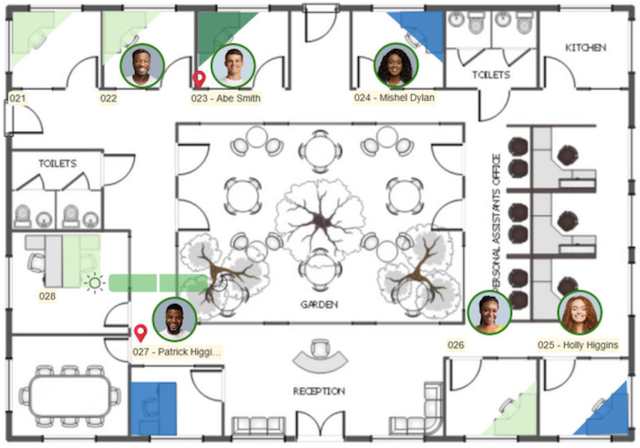
People need to see what’s free at a glance. On a good desk booking system, the visual floor‑plan editor lets users reserve a desk directly from the plan and shows which spaces are booked. Simple as that!
Capacity management and occupancy controls
Hybrid offices rarely reach 100 % occupancy. A solid system lets admins set limits on how many people can be in a zone or on a floor and restrict bookings when limits are reached.
Team and area bookings
Sometimes you don’t want individuals scattered randomly; you want a project team together. Look for software that supports team bookings, dedicated desks for specific users, and area control, so only certain departments can book certain zones. This prevents the free‑for‑all that leaves marketing camped in finance’s neighbourhood.
Integrated help and guidance
Change management is tough. A good platform makes it easy for people to learn the system with built‑in help pages and clear cues. It should also provide simple check‑in and check‑out actions so that unused desks free up quickly.
When it comes to integrations, your desk booking system should work with the calendars your people already use. Solutions that integrate with Microsoft 365, Microsoft Exchange and Google Workspace allow employees to reserve desks right from their familiar tools.
When hot desking is the right fit
Hot desking isn’t for everyone; the same goes for RTOs. We think there are specific use cases that could benefit from this solution.
It shines in hybrid offices (e.g., companies with hybrid or field employees or project-based and consulting firms), co‑working hubs and shared office spaces. We covered the perfect use case for hot desking in another article; you can read it here.
If you’re running a dedicated, fully in‑person environment where everyone has a permanent seat, you probably don’t need desk booking software. But if your occupancy fluctuates daily, a well‑implemented hot desking tool is going to remove any desk fights.
Why Door Tablet BOOKER stands out
Let’s talk about solutions!
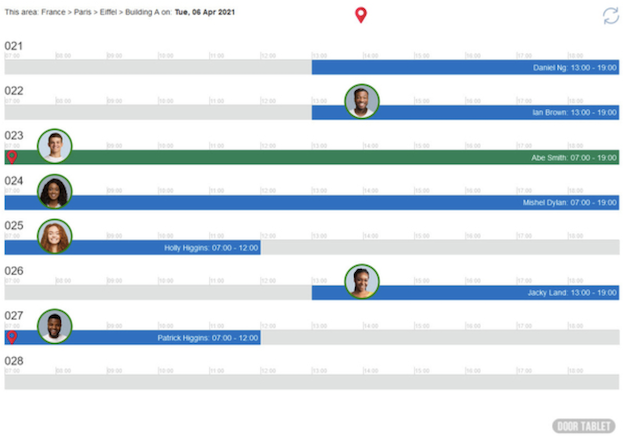
Door Tablet BOOKER is a fully web‑based, designed to manage desks, and it can be used with or without hardware. Admins can set capacity rules, team‑based bookings and dedicated desks while users can see a live floor plan and book seats in seconds.
Door Tablet BOOKER also stands out for its hardware options. You can deploy interactive displays on desk clusters or use battery‑powered e‑paper displays for low‑cost deployment.
It gives your teams real‑time availability, on‑screen booking, and full visibility across the workplace via the floor plan.
And because it’s built on the same platform as Door Tablet’s meeting‑room displays, the experience is consistent: users can book, extend or cancel their desks or rooms on the device itself, with visual floor‑plan navigation and area‑based controls.
From an IT perspective, BOOKER offers configurable business rules and area‑based restrictions. You decide whether walk‑in bookings are allowed, how long a reservation lasts, and what zones are off limits.
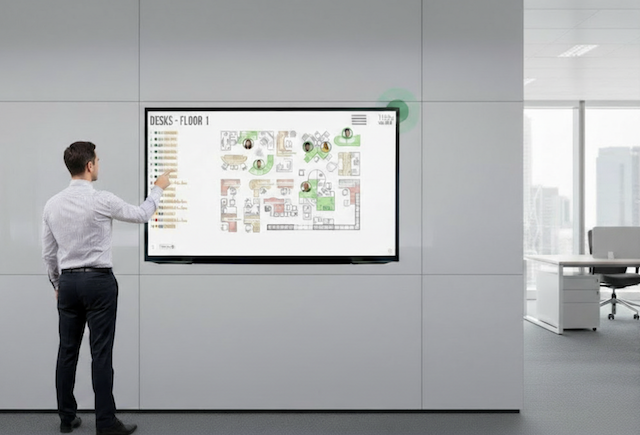
What if you want the benefits of desk booking without placing a device on every desk? Many organisations are opting for a "central hub" approach by deploying a large kiosk in a lobby or communal space. You can display Door Tablet's interactive floor plan on a large-format kiosk in your lobby or at the entrance to a specific floor. Your teams can walk up to the kiosk and instantly visualise all available desks on the floor plan, tap a free space, and secure it on the spot.
Ready to make desks work for people?
If your current desk situation feels like a comedy of errors, it’s time to fix it. A mature hot desking solution does more than assign seats; it brings order to the chaos of hybrid work. Door Tablet BOOKER delivers the floor‑plan visuals, capacity controls and integration you need to make hot desking fair and effortless. Take the next step and see how it can transform your hybrid office. See Door Tablet BOOKER in action.